PDF Pal (2024): Chat with PDFs using RAG
A web app that lets users upload PDFs and ask questions in natural language using Retrieval-Augmented Generation (RAG) over the document.
Product Screenshots
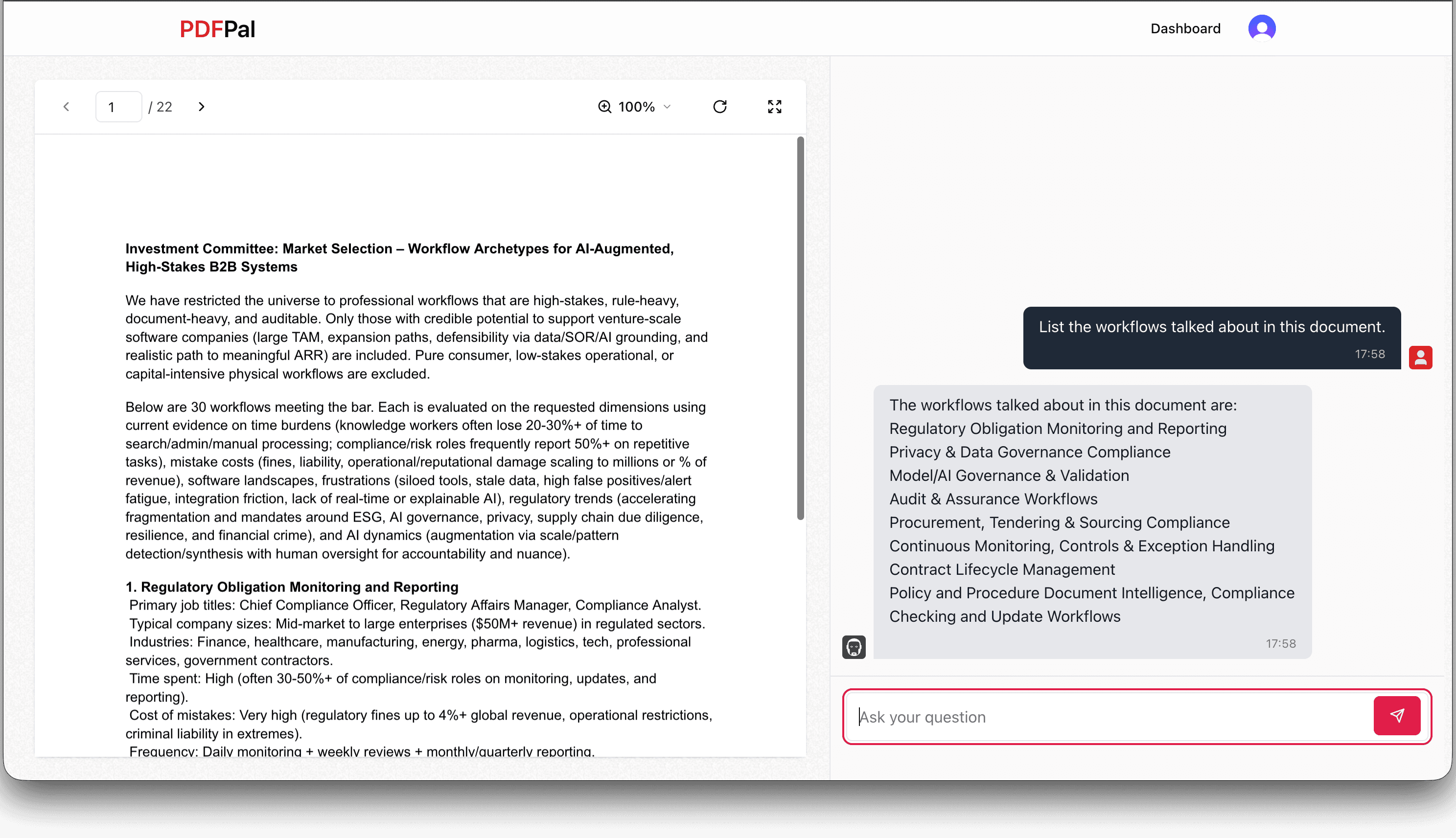
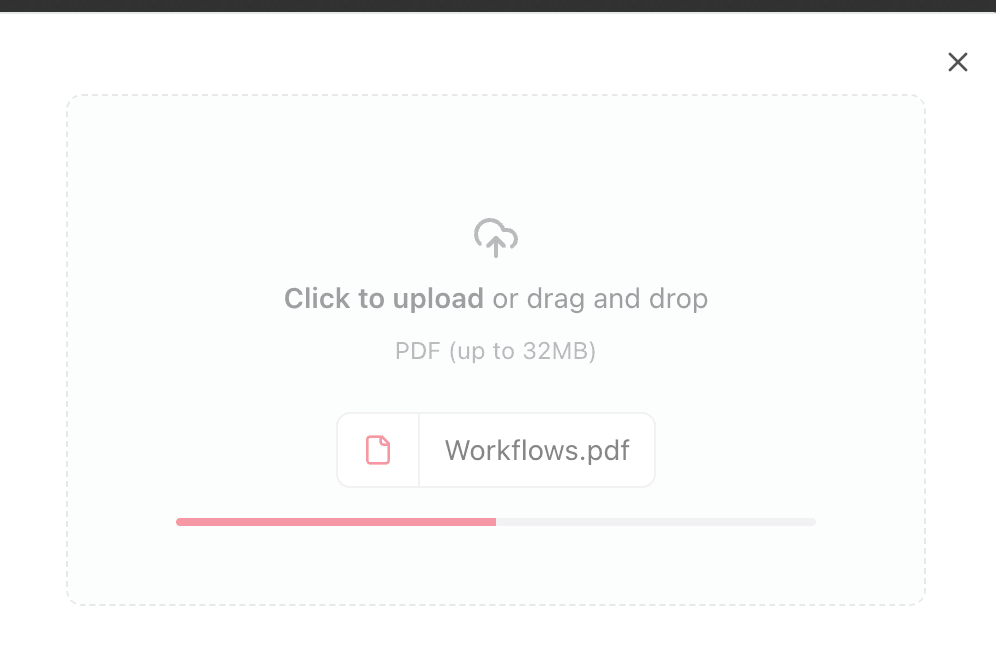
Problem
I built this in university, during a year I was missing a lot of classes and needed to get through dense course PDFs quickly without falling behind. The problem underneath: PDFs are hard to search, slow to read, and don't let you ask questions grounded in the document.
Solution
A SaaS application where users: (1) Upload a PDF, (2) Ask questions in natural language, (3) Receive contextual answers grounded in the PDF using RAG.
Tech Stack
Frontend
Backend
Database
Auth
AI
File storage
Core Data Flows
Upload & Processing Pipeline
- UploadThing receives the PDF
- onUploadComplete triggers: (1) Create file record in DB with PROCESSING status, (2) Extract text pages via PDFLoader, (3) Generate one embedding per page via OpenAI (page-level vectors), (4) Store embeddings in Pinecone (namespace per file), (5) Update status to SUCCESS or FAILED
- Each PDF uses its own Pinecone namespace for isolation
- Page-level vectors keep every answer traceable to a specific source page
- Status tracking supports real-time UI feedback
Chat / RAG Pipeline
- User asks a question
- POST /api/message: (1) Save user message to DB, (2) Embed question, (3) Similarity search Pinecone (top 4 pages), (4) Build prompt including retrieved context + recent message history + current question, (5) Stream OpenAI response to client, (6) Save AI response to DB
Database Design
Three core entities: User (email + auth fields), File (uploadStatus + URL/key + relations), and Message (text + isUserMessage + relations). UploadStatus enum tracks the pipeline: PENDING, PROCESSING, SUCCESS, FAILED.
Architecture Highlights
- End-to-end type safety via tRPC
- Vector isolation via Pinecone namespace per file
- Streaming UX for responsiveness
- Upload status polling with automatic UI updates
- PostgreSQL for relational data + Pinecone for similarity search
- Edge-ready Vercel deployment configuration
Key Features
PDF Viewer
- Page navigation
- Zoom (100%-300%)
- Rotation
- Fullscreen
- Responsive split-pane layout
Chat
- Streaming responses
- Infinite scroll history
- Markdown rendering
- Optimistic updates
- Context-aware answers
Key Design Decisions
- Used Pinecone namespaces per document instead of a shared index. Eliminates cross-document leakage and simplifies deletion without index-wide operations
- Went with tRPC instead of REST. When the types run all the way from the database to the UI, the frontend/backend mismatch bugs mostly stop happening.
- Implemented streaming responses from OpenAI rather than waiting for completion. Improves perceived latency for long answers
- Built a split-pane layout (chat + PDF viewer with zoom, rotate, fullscreen). Users need to verify AI answers against the source document
- Embedded one vector per PDF page instead of character-chunking. Keeps every retrieved answer traceable to a source page and makes per-file deletion trivial
- Chose Clerk over custom auth. Authentication is not a differentiator for this product
Tradeoffs
- A Pinecone namespace per document means you can't query across documents. That's the point: it kills context bleed, the failure mode that quietly wrecks multi-doc RAG.
- tRPC ties the frontend and backend together tightly, which would bite the day I needed a public API. For a solo SaaS, end-to-end types were worth more to me than that flexibility.
- Streaming made error handling and message persistence fiddlier than a plain request/response. Watching the answer land token by token earned back the trouble.
Outcome
Live at pdfpal.enkambale.com. Users upload a PDF and get streaming, context-grounded AI answers within seconds, with per-document vector isolation preventing the most common RAG failure: cross-document context bleed. Billing was scoped but never finished, so it stayed a free tool.
Lessons Learned
- Swapping the model barely moved answer quality. Chunking and isolation moved it a lot. That surprised me, and it's shaped how I build RAG ever since.
- Half of 'good AI UX' is just progressive rendering. The exact same answer feels broken when it lands all at once and responsive when it streams in.
- One namespace per document is the line between 'trustworthy' and 'why is it citing someone else's contract'. I wouldn't ship multi-tenant RAG without it.
- Shipping the whole thing, auth and upload through retrieval and streaming AI, surfaced constraints no prototype ever would. You learn what a system actually costs by running it.